|
|
|
|
|
|
|
|
|
 |
|
|||||||
|
SysteMagicK - ButtonIt! Documentation Viewer
Button It! - Introduction Button It! - Button States and Bindings Button It! - Button Groups Button It! - Defining Styles Button It! - Layout Button It! - Registration Button It! - Saving Images Button It! - Style Presets Button It! - Support Button It! - Swapping Presets Button It! - Symbol Selector Button It! - Variations VariationsVariations describe ways of changing a style by altering certain of its settings. For example, a commonly used variation would be 'Invert', which would set the 'invert' setting of the style to 'true' in order to create a variation on that style. There are several built-in variations that you can use, or you can define your own. Defining a variation is quite simple. First, you choose the 'Button Variations' tab. Then click 'Add new':
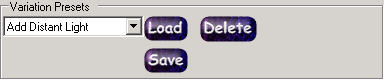
The style editor dialog is displayed (for more information on this dialog, see Defining Styles) with the settings from your current 'base style' for the project (defined via the Basic Style and Settings tab). Change the settings that you wish the variation to represent. For example if you want a variation for 'change colour to red', you simply set the colour in the style editor. When you are done, click okay. You will be prompted for a name for the variation. Enter an appropriate name (such as 'Make red'), and click okay. Your new variation will be added to the drop down list of loaded variations. In addition, this variation becomes the currently selected variation, and the image list at the bottom of the tab is updated to reflect what your current Button Set would look like if the new variation were applied to you current 'base style'. The 'Redefine' button allows you to redefine the currently selected variation from scratch (i.e. your starting point will be 'no differences from the base style'). The 'Edit Button' allows you to make modifications to the currently selected variations (i.e. your starting point will be whatever the variation was previously defined as). It should be noted that variations are remembered as changes to the settings of a style. As noted in Defining Styles, different style 'classes' may have different settings. As such some variations may modify settings that are not applicable to all style classes. For example, several of the classes support 'lighting settings', and several don't. If you create a variation that modifies the lighting settings (e.g. perhaps to add an extra light), and try to apply that variation to a style that uses a class that doesn't support lighting settings (such as the 'bevelled' class), the variation will have no visible affect (unless you made other changes in the variation that are supported by the 'bevelled class', of course). Variations, like styles, can be saved as 'presets'. If you think you may use a variation again in the future, simply click the 'Save button' on the button variations tab:
The variation will be saved with whatever name you gave it. To load a previously saved variation, just select the name from the 'Variation Presets' drop-down list, and click load. |
 |
|||||||
 |
 |
 |
 |
 |
 |
 |
|
|
 |
 |
|
||||||
 |
|
|||||||